
Join Tom on his adevntures across the Salesforce ecosystem

Salesforce Spring ‘26: Release Quickfire
Tom Rook - 08 Feb 2026
Back again! Salesforce’s Spring ‘26 release brings with it a whole host of features, I have trawled the release notes to bring you the best that spring ‘26 has to offer! Check out what caught my eye, and what I think you should be excited to learn about!
Flow Analytics on the Canvas
I am actually so excited for this singular feature, I have spent a worryingly large amount of time trying to catch flow errors. Trawling through the automation app’s monitor page, deciphering user descriptions of where their issue lies, interprting screenshots of lord knows what and where. Well I now have a helping hand in that area from something that started out as a Data 360 only Feature. On Canvas insights gives an insight (ha) into flow runs statuses, total runs average duration and some other things given appropriate licences (engagement metrics with marketing cloud next and other such things!)
Just knowing how often a flow runs/doesn’t run is enough for me!
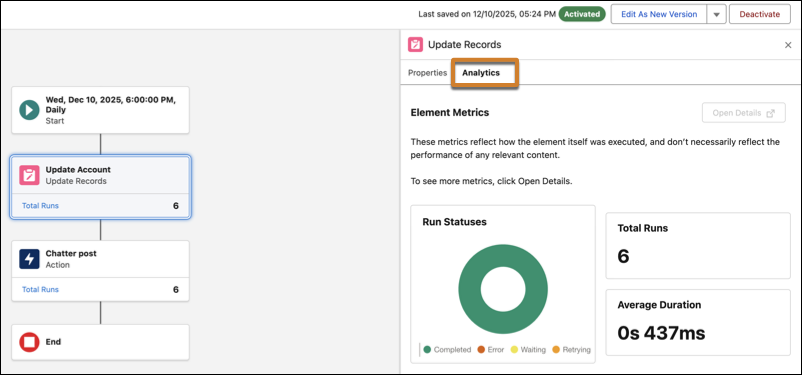
Monitor Performance for Active and Previously Run Flows on the Canvas
Better Flow navigation
For those in the flow-nation, followers of Obiwan Flow-nobi and students of Ang the Last Flow Bender we have spent many collective hours navigating the flow canvas. So you’ll be happy to hear this has received some love from Salesforce with TWO whole changes. Firstly navigation is updated, instead of click and hold navigation, you can use your trackpad, scroll wheel and arrow keys or the recently added on screen scroll bars to zip around.
The second navigation enhancement is collapsible flow elements, this apples to Wait, Decision, Loop, Path Experiment, and Async Actions using a handy dandy arrow next to the element they can be collapsed/uncollapsed and your browser even remembers the configuration each time so if you always hide the Async path it will stay hidden!
(Should mention for both of these they seem to work best in Auto-Layout with collapsible elements not available at all in Free-Form)
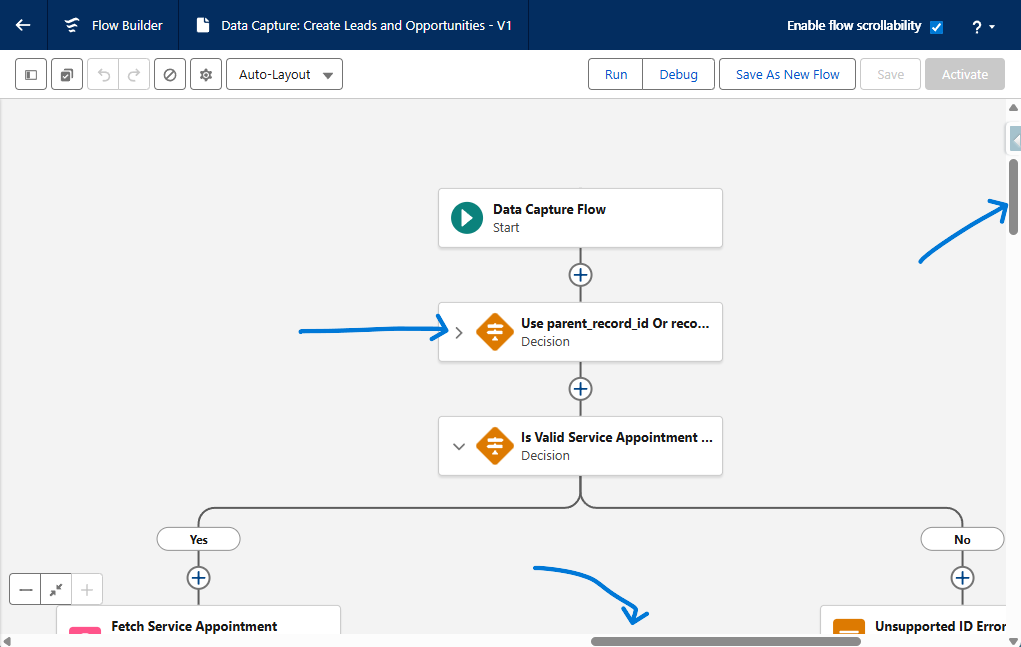
Navigate Flow Builder Faster with Enhanced Scrolling
Simplify Your Flow Builder Layout by Collapsing Branching Elements
Flow Usage!
What a cool place the Automation app is becoming, I was today years old when I learnt that you could edit the pages in this app? (The page is shared between both the flow and orchestration records so changes to one happens to the other) That mild tangent aside, check out where a flow is used and what flows it uses with the help of the usage tab!
Automation App > Flow Record > Usage Tab > Use Flows/Uses Orchestrations
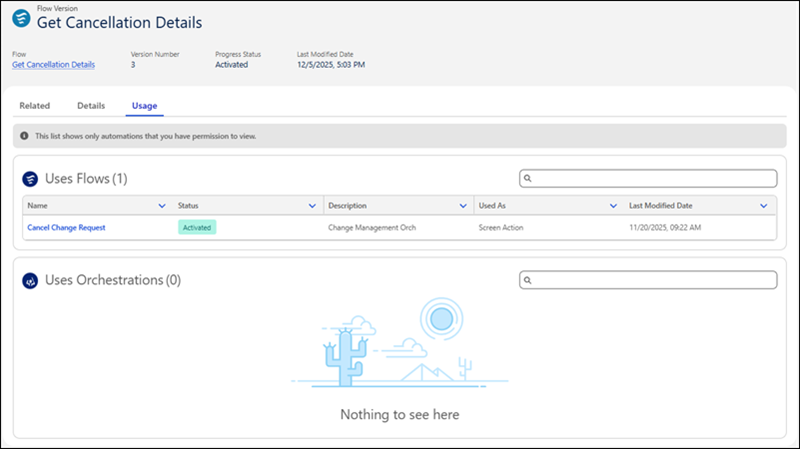
View Flow Usage in the Automation Lightning App
Data Form Changes
I have been learning a lot about these funky little field service specific flows, this release comes with a raft of changes. My favourites have to be 80% faster running (who wouldn’t like that?) and being able to run them from Asset and Custom Objects. Previously they were exclusive to Work Orders and Service Appointments.
Capture Data Even Faster with up to 80% Improvement in Form Loading Times Boost Efficiency by Expanding Data Capture to Assets and Custom Objects
No more custom button to submit flow approvals!
I have made no secret about my favourite feature of recent releases being Salesforce flow approvals, one thing that was always harder than it should have been was submitting a record for approval manually. Now that is made significantly easier with the ability to submit flow from a button the the page layout, I really wanted some screenshots of this working but my preview org did not come with the approvals app… weird! Take my word for it, you can submit select first approver and add comments just like the old days!
Add Approval Submissions to Record Pages Without Custom Buttons
tags: technology - Salesforce - AI - Agentforce - Coding